

Know the dealer.
See the evidence.
Decide with confidence.
An evidence-led view of every dealer before funding, and an owned Aftersales CRM after it. Built for brokers, lenders and compliance teams.
Illustrative passport · fictional dealers
- UK motor-finance focus
- Five connected intelligence sources
- Broker and lender workspaces
- Audit-ready evidence
- Aftersales CRM included
Dealer risk rarely arrives in one place.
Checks, payouts and complaints live in different systems, owned by different people. ShareGuard joins them up.
Dealer information is fragmented
Company records, FCA status, finances and reviews are checked separately, so nobody sees the full dealer picture at once.
Risk can emerge after payout
A permission change, filing problem or complaint cluster can appear months after funding, when it is harder to act.
Complaints and outcomes sit apart
Cases live in inboxes and spreadsheets, disconnected from the dealer evidence that would explain them.
One dealer record. Six connected layers.
Each layer is a separate, source-labelled evidence set. Open any layer for what it covers and where its limits are.
CompanyStructure, history, ownership and filings, verified against Companies House where provider access is configured.
- Registered identity, officers and ownership structure
- Filing history and key company events
- Collection may be held operationally; coverage depends on configured sources
RegulatoryFCA authorisation, permissions and regulatory status, recorded as evidence at the time of retrieval.
- Authorisation status and permissions
- Status is as recorded at retrieval, not a live guarantee
- Changes can be flagged on watched dealers
FinancialFinancial health, stability and early warning indicators from a permitted financial data provider.
- Turnover, stability and credit-risk indicators
- Depends on an available, permitted provider
- No financial rating is claimed as active in every deployment
OnlineWebsite, reviews, news and reputational signals summarised as separate, source-labelled items.
- Website and trading presence
- Reviews and news signals
- Coverage varies and collection may be paused
OutcomesComplaints, unwinds and placement performance supplied by participating organisations.
- Broker-supplied complaint and unwind information
- Figures only reflect what has been provided
- Links to Aftersales CRM cases where recorded
DecisionYour policy, the ShareGuard Rating and recorded review steps, brought into one evidenced decision.
- Proceed, Review or Pause recorded by your team
- The rating is an aid to review, not a verdict
- Review steps recorded as application events
One platform. Three distinct views.
Choose a role to see its dashboard, benefits and controls. All previews are illustrative.
Key benefits
- Check a dealer before placing business
- Spot unwind and complaint risk earlier
- Run complaints in the included Aftersales CRM
Available controls
- Dealer search
- Compare dealers
- Watchlists
- Proceed / Review / Pause
- Aftersales board
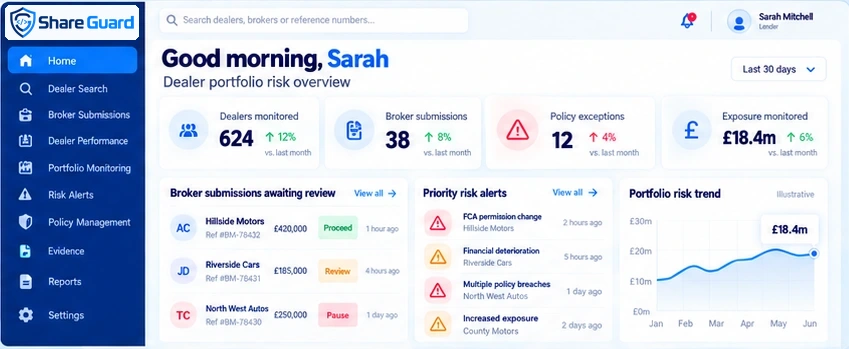
Key benefits
- See dealer exposure across the portfolio
- Apply your own lending policy consistently
- Focus review on exceptions and recorded changes
Available controls
- Policy overlay
- Exposure view
- Broker performance
- Exception queue
- Risk alerts
Key benefits
- Review organisations before activation
- Protected administrative access with MFA
- No direct rating override or unrestricted tenant-intelligence browsing
Available controls
- Access review
- Organisation approval
- Activation holds
- Recorded events
Search to monitor, in five evidenced stages.
Your team makes the decision. ShareGuard keeps the evidence and the reasons together.
- 01Search
Find a UK dealer by name or company number.
- 02Analyse
Combine company, FCA, financial, online and outcome signals.
- 03Apply Policy
Compare evidence against broker or lender criteria.
- 04Decide
Record Proceed, Review or Pause with the reasons.
- 05Monitor
Watch recorded changes and keep the decision trail.
More than dealer evidence.
An Aftersales CRM built for brokers.
When a complaint arrives, your team needs more than an inbox and a spreadsheet: customer profiles, owned cases, tasks, investigation positions and cost records, right next to the dealer evidence.
- No more cases living in one person's inbox
- No more rebuilding the story at handover
- No more guessing who owns the next step
Aftersales CRM at a glanceEvery complaint owned, timed and linked to the dealer.
- Customer management
- Complaint cases
- SLA monitoring against your internal targets
- Tasks and ownership
- Recorded communications
- Evidence and documents
- Costs and outcomes
- Dealer-linked intelligence
Workspaces, the full case record, SLA view and team benefits are on the Aftersales CRM page.
Looking for what is inside a case? It now lives on the Aftersales CRM page.
New
Investigating
Awaiting info
Controlled access. Recorded decisions.
Role-based accessPermissions by assigned role
Permissions follow the assigned role. Signing in alone never grants organisation data.
Organisation separationCompany-scoped records
Records are associated with an organisation and application queries are scoped to it.
Decision historyReasons alongside decisions
Proceed, Review or Pause decisions are kept with the evidence that informed them.
Evidence recordsEvidence for your audit trail
Key review steps are recorded as application events to support your own audit trail.
Controlled account activationOwner-reviewed activation
New organisations and users are reviewed by the platform owner before activation.
- Dealer searched and profile openedReviewer A · 09:14
- Company and FCA evidence recordedSource-labelled items · 09:15
- Lender policy compared: one item to reviewPolicy overlay · 09:18
- Decision recorded: Review, with noteReviewer A · 09:22
- Dealer added to watchlistReviewer A · 09:23
Know the dealer before the deal. Manage the outcome after it.
See dealer intelligence and the Aftersales CRM together, walked through by our team.
Product views shown on this page are illustrative and use fictional data.